1


cross-posted from: https://reddthat.com/post/67230316

I'm using Heroic launcher to play games lately, otherwise have used Lutris or Steam or Faugus etc. I got Dead Rising 2 and have run into this issue of it won't register (in game) that I'm using a controller, or would like to. In all the other games that I have played on any of these platforms, controller support is wonderful. I'm running CachyOS on my machine, so no issues here either. This particular problem had persisted despite using CachyOS, Nobara, PikaOS, or standard Ubuntu. I'm about to start pulling my hair out as I don't know what's causing this. Everything is up to date, and runs smoothly otherwise. I just can't get this game to let me use the controller I have. It even has settings in game specifically for controllers. What do I do? Thank you.

2


cross-posted from: https://reddthat.com/post/60170549

I'm trying to get my Gamesir T4n Lite controller to work on the PCSX2 emulator to no avail. It works with Steam just fine, but all it says I'm connected to is a keyboard and mouse. It has it's own dongle for Bluetooth, my system doesn't have Bluetooth built in. I'm using Ubuntu 24. I have downloaded xpad and xpadneo drivers, I've done the joystick test, everything. The computer seems fine, all looks well. It's just that the PCSX2 emulator won't pick it up for some reason. If anyone has any way to fix this, it'd be greatly appreciated.

3


This is something I have already posted in both LOS groups and no fix so far, coming here. Here's the copy-paste of the post I made prior, plus an update at the end for clarification.

-( So, here we go again. The first time I had an issue was because of a scam card. Now, I have a real SD card. Problem: I have been trying to move music and photos to it to keep on my new device (Moto G Stylus 5G 2022 / milanf) and when I insert it into my phone it says "Issue with SD card." And it wants me to set it up. However, when I plug it into a computer it's totally fine. I can't find any answers online, and the only other issue I saw similar was someone using a Xiaomi device running LOS 17. I didn't have the issue on my phone until the most recent LOS 23 update on the 8th of Jan. What do I do to resolve this? I don't want to have to carry multiple devices with me, for the time being, to access certain photos or music.

  • edit: I neglected to add this detail. It has been formatted by the Lineage device, but the issue persists.)

I have been able to move music over after it's been formatted by the phone and that seems to be fine, but when I insert the SD card into my old Samsung Note 10 Plus and then download all the pictures and videos I have I then reinsert it into my LOS phone and it says the SD card is corrupted. I didn't have this issue until the latest update and I don't know what to do to fix it. Nothing is wrong with the card, I'm at my wits end. I have been dealing with this for a month. Please help.

4


I just got a new device and flashed LineageOS to it. No issues there, that part is fine. What isn't fine is that I am trying to move music, videos, and pictures from my old device to the new one. Old device is stock Android, however hardware-wise the charging port / USB C port exploded a few years ago, so I can't plug it into anything to move things that way, and have to rely on either swapping SD cards back and forth or trying to use a nearby share service or cloud service. Problems: the cloud service I use is dogshit and the upload/download speeds are awful. Part of that is being stuck with the worst ISP and the other part is that it's not a great service and found out way too late. Not a viable option. The nearby share application I use is called LocalSend and it works fine, but I still seem to not have ALL the files I'm trying to move despite watching it move every single file. Lastly, when I have used the SD card swapping method, formatting it to different things, etc. I still have the issue of not all the files I want show up AT ALL. Example: trying to copy over roughly 14k to 27k songs, but each method I have used only produces approx. ~5k songs in total. What is going on here? I also have realized that I cannot write images in bulk to the SD card from the old device, as it stops and then gives me a warning about how it's been set to read only. The music when I transfer it this way does not give me the same message, but I still end up with a fraction of what I actually have. Is this an error mostly with the SD card and should I just buy a new one, or do you think there's something else going on here? I really want to move everything over and not have to just give up. I'll take whatever suggestions I can get. Only reason I think it could be an SD card issue is that when I tried to do backups of all data on both devices it fails each time. No specific errors other than just saying it fails.

5


How can kids use turbowarp desktop to explore into the world of computers ??

6


This was given to me today and I'm trying to mess with it to no avail. I haven't been able to root the damn thing no matter what I try. And the OEM unlocking option is absent from the developer options altogether. I have tried trick after trick, gome through step after step, and it just doesn't seem to want to let me root it. I can't flash anything on it without that as far as I am aware. The I try to mess with thw bootloader but the whole thing is in Chinese. I am extremely limited in my ability to read it. I would post pictures but for some reason I'm not able to post pictures on here anymore. But that's a separate issue. Here's some more info on the device: runs Android 4.4.2, kernel is 3.4.67. It's an iDroid Royal v7. Dunno what else I need to add, but I'll say what I can I just want to root the damn thing to play with it further. Thanks.

7


I have a Western Digital 4TB hard drive, and everything has been going well until recently where I had to move a computer from one room to the next. Everything was turned off and then unplugged to be moved. I plugged it all back in, turned it all back on, and then suddenly it's locked me out. I also previously before putting any data on it (this was months ago now) formatted it to be ext4 for internal use with my computer (Arch btw). Now a thing pops up in Removable Devices called WD Unlocker. I looked for everything to help me. I even plugged it into a Windows computer I had lying around to use the tool. I never put a password on it, so the tutorials were kind of useless and despite running the unlocker .exe it still won't let me access anything on it. The error message I get at the top of Dolphin says an error occurred while accessing mydrive, the system responded: an unspecified error has occurred. Did not recieve reply. Possible causes include: the remote application did not send a reply, the message bus security policy blocked the reply, the reply timeout expired, or the network connection was broken. I was able to get access to some files somehow like 2 days ago, but now I'm dealing with the same issue, regardless of booting the computer, and cycling on and off, I cannot for the life of me figure out how to fix this. I even tried using a partition manager to see what was up, but it either loads in days amounts of time, or will pull up but not show what could be causing this since I didn't expect any software to be active on it since originally formatting. Please help me. I don't want to lose almost 4TB of stuff just because it's acting stupid on me. I feel like I've tried everything, and the only other answer from looking things up I've gotten was that WD drives are stupid as hell for this specific reason. I'm at my wits end.

8


cross-posted from: https://lemmy.ml/post/20046740

I have just started using Lemmy and I love it.

I have had good results sending Lemmy posts to Masto, and vice-versa. One exception has been the above group shown in the title. In Masto, send/receive posts works fine, but the Lemmy version seems cut off from the rest of the Fediverse.

Could someone look into that? Thanks.

9


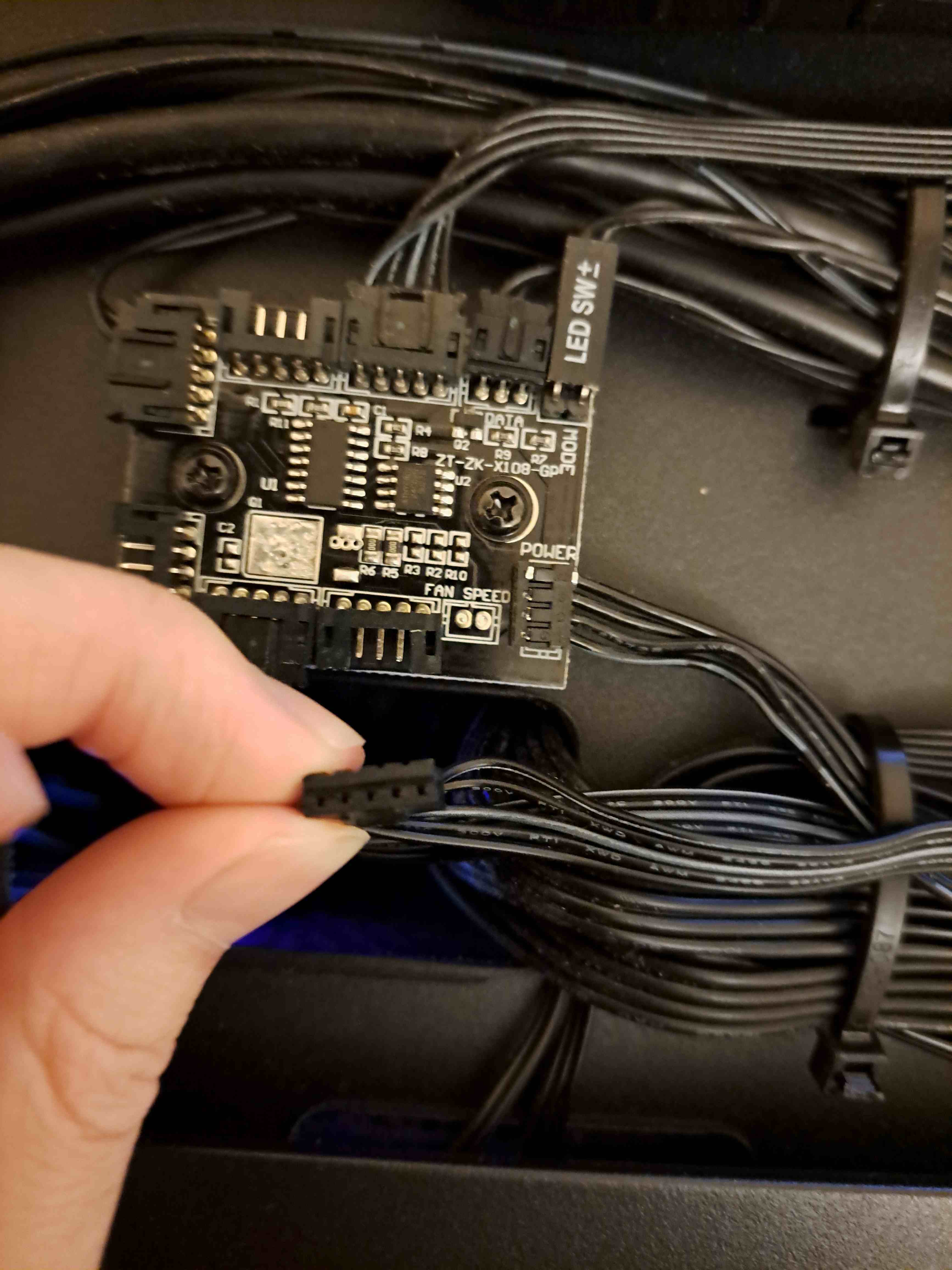
I have a skytech gaming prebuilt pc (don't ask why prebuilt, it was out of my control). I find the fans extremely loud and annoying.

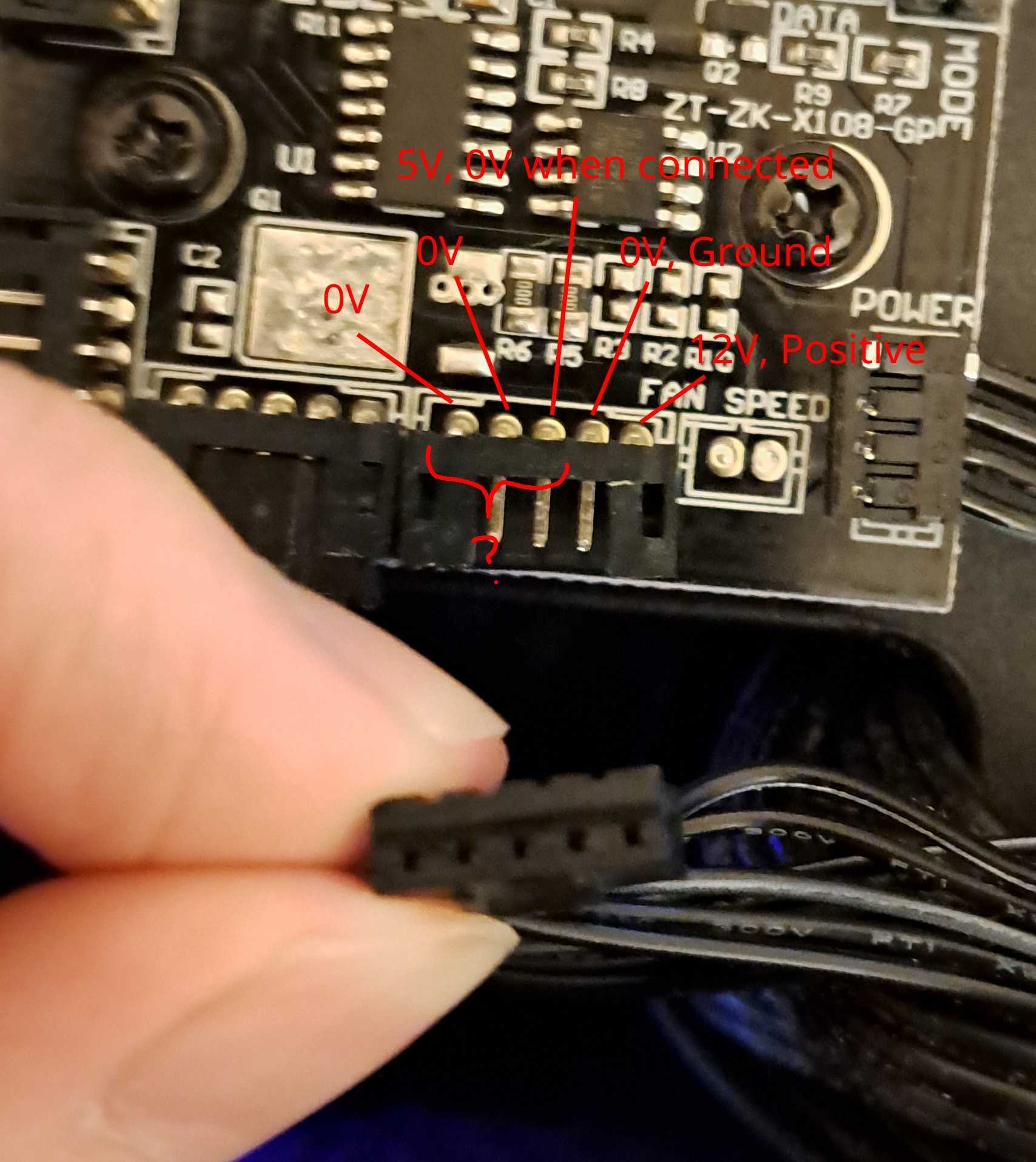
I'm trying to figure out what each of the pins do so I can connect it to the case fan pins on the motherboard instead of wherever the prebuilt connected it. I tried searching online but I couldn't find anything about what function each pin serves. I also had a multimeter and battery and I figured out that the rightmost pin is positive and the second rightmost pin is ground, but I have no idea what the other 3 pins do. The center pin I measured at 5 volts, but when I connected the fan and measured again, there was no potential difference.

Does anyone knows any information about this 5 pin connector or knows where I can find documentation/specification?

Also if there are any other ways to make the case fans not run at 100% power all the time, please let me know.

10


Basically I'll be listening to anything and suddenly the phone/Buds will think I'm in a call (I'm not) and the sound will be worse. It then reverts by itself after 2 minutes. Help

11
submitted 2 years ago* (last edited 2 years ago) by to c/techsupport@lemmy.ml


cross-posted from: https://monyet.cc/post/815998

SOLVED

After removing the CMOS battery in addition to the main battery, and powering the laptop on it worked. After, I readded both batteries and it now continues working. Maybe I should replace both batteries to avoid that happening again in the future?

Thank you very much for your support!

https://monyet.cc/comment/1875010


Yesterday I was using my Lenovo Ideapad laptop until the screen went totally black, but it was still on as the led's light was on. 1 or 2 minutes gone by with me trying to press keys for brightness etc, and then it suddenly shutdown. Afterwards trying to turn it on again, the led will bright for 2 seconds until it shuts itself down...

I tried removing and putting the battery again to no luck.

First I thought it could be the CPU/iGPU, now maybe the battery or motherboard is the issue? I repaired this latop many times, but this is the first time this happens, so I don't know what it can be..

Apart from an old and low-end smartphone I'm using to write this, this is the only computer I own.

12


I have some bluetooth earbuds, Jabra Elite 3's, that I use with my phone most of the time. I also share them as well so sometimes they're connected to someone else's phone. I also like to connect them to my macbook. The frustrating thing is though, I've succesfully paired them with all of these 3 devices before, but it's really frustrating to connect them to something other than the last device they connected to.

If they most recently connected to my phone before and I decide to use them with my laptop, I remove them from their case, but they immediately connect to my phone. This is good, because that's usually what I want them to do, but I hoped I could, from my laptop select them from the list of nearby bluetooth devices and click 'connect' and thereby sever that connection between the headphones and my phone, in favour of the new connection between the laptop and the headphones instead. This doesn't work, the computer just says connecting for a long time, and then stops saying that (but doesn't say anything about having failed).

Ok, I figured, that sort of makes sense, after all you wouldn't want people to be able to just break your connection at will if you're using the headphones (although it would require having previously paired them, but still, devil's advocate I suppose). So I reasoned, you must have to disconnect them from the phone first, on my headphones that's achievable by just pressing the button on each bud once. Doing this disconnects them from the phone, but doesn't them leave them available to other devices for connection, they remain only available to the phone if you press the button again. The only way to finally sever this connection to allow the laptop access is to fully switch off bluetooth on my phone. This pisses me off but it's not a huge big deal, but the trouble here is, that's only if they're connected to my phone. The headphones are shared. I would have thought the 'ownership' of the headphones (for lack of a better word) would give precedence to physical access to the headphones. Therefore, if you have the ability to press the disconnect button on the headphones, then you're most likely the person making the conscious decision to replace one connection with another. I can't control someone else's phone, I'm the one with the headphones, but I can't choose what device they connect to.

Rant aside, this genuinely is a question because it just seems so illogical for it to work this way that I'm betting on there being something I'm missing that would allow common sense to prevail and let me replace one connection with another.

13


Start a file explorer from the folder icon on task bar - window comes up, spinny wheel for 2-3 seconds, entire desktop crashes and comes back up. Event viewer cites the application error mentioned in the title.

A Dell precision 5520 laptop, good specs, fresh-ish install of 10, rockwell software and other stuff. Had been working normally.

User says he installed a prompted Dell update last night, which could be legit.

SFC scannow - found and repaired corrupted files. Did not fix the problem.

Did the power shell windows image repair-online thing. Did not fix problem

Windows defender scan - found nothing

Put on a windows update, updates are current, did not fix problem.

Uninstalled the latest VCruntime packages, reinstalled, did not fix problem

Safe mode - problem does not arise, thought maybe I could REPLACE the ucrtbase.dll, but alas it appears to be quite difficult to do. The DLL is dated 2022 which may or may not mean anything. That may indicate it isn't the real issue.

So, HERE is the interesting thing-

Right click on desktop, create "New Folder".

Open "New Folder" and a file explorer window comes up, and does NOT crash. Works fine.

Unpin folder icon from task bar, drag new folder icon to task bar, pin. Launch file explorer window from the task bar, crashes explorer.exe as before.

Go back to "new folder" icon on desktop - works fine.

Headdesk.

Any idea why this would happen? Any way to fix?

14


is there a way i can transfer my itunes music to a cloud storage from my ipad or a linux laptop without using some stupid proprietary software?

15
16
submitted 4 years ago by [M] to c/techsupport@lemmy.ml


The only method to backup your Chrome Reading List.

17


In this post we will show you 10 steps that you can apply to fix YouTube thumbnail not showing on Facebook.

18


Change the default location of where Google Chrome gets installed on your Windows 11 PC.

19
A more secure Google account with 2SV (www.unemployedtechie.com)
submitted 4 years ago by [M] to c/techsupport@lemmy.ml


Google will auto enroll its users for their 2SV login. What's it all about.

20


Download the Windows 10 ISO image file, without using the Media Creation Tool from Microsoft.

21
4 ways to get 100% free domains (www.unemployedtechie.com)
submitted 4 years ago by [M] to c/techsupport@lemmy.ml


4 workable ways to get 100% free domains.

22


Microsoft has a nagware that would keep asking you to upgrade to Windows 10 if you are using Windows 7. If you are using an older PC, I would not suggest doing that. Instead, try this hack to ensure that you do not get any notifications anymore.

23
Utility: Ventoy (github.com)
submitted 4 years ago by to c/techsupport@lemmy.ml


A flashable bootable system that easily allows you to boot from a list of ISO/WIM/IMG/VHD files.

24
submitted 4 years ago by [M] to c/techsupport@lemmy.ml


cross-posted from: https://lemmy.ml/post/86246

Installing Windows 11 is not enough, you should keep a bootable USB handy since Windows 11 is still full of bugs. To create a bootable USB, you would need a Windows 11 ISO file. Here's how you can download it.

25


cross-posted from: https://lemmy.ml/post/86247

How often have it happened that you were locked out of your own Windows PC? Not anymore. Here is a surefire way to ensure that you never get locked out of your Windows 11 PC again.

view more: next ›