1


I think max I would want to spend might be $3000 but there's wiggle room.

Edit: we're getting a little distracted by what's on the outdated newegg list, so here's what you need to know

Processor : AMD Ryzen 9 5950X 16-Core 3.4 GHz

Gpu: ASUS Radeon RX 6700 XT 12GB

MOBO: ASUS ROG STRIX X570-E GAMING WIFI II AM4

2
submitted 1 year ago* (last edited 10 months ago) by to c/pcbuilding@lemmy.ml


This is not necessarily PC building but I don't know where else to ask about it.

I'm looking for printer (office use) without scammy practices by printer companies. I want to connect it to Linux machine and maybe phone line (for fax). Other machines can just send print to connected Linux machine.

Please let me know if there r suggestions.

3


I need to connect a laptop optical drive to my rig and the adapter I'm using kind of sucks. I've heard of issues with molex to sata cables and I tend to worry a lot.

4


I'm going to pick one up locally tomorrow for $225, worth it?

https://m.facebook.com/marketplace/item/586305583769704/

5


I have 2 questions that may or may not be related:

  1. My gaming PC periodically has full system crashes while I'm playing some games. I've tried looking at crash reports but I couldn't really figure out what was different from looking at them. I've seen it suggested that it could be overheating, although it's kind of hard to tell since the temp range when I check isn't that high, but I do feel a lot of heat coming off the machine when I stick my hand over the vent and I hear the fans working hard when I'm playing some games.

  2. I was thinking that it might be worth it to try to upgrade some parts to maybe alleviate one possible source of issues. So what I'm wondering is what the best approach would be. For example would getting a better graphics card make it work less hard and produce less heat? Or does a more powerful card just produce more heat? How much can I reasonable upgrade cooling systems given a fixed amount of space in the case? It's been a while since I've manually swapped out parts. Last 2 PC I opted for just buying pre-made although in the past I built one. The one I have now is an Alienware Aurora R11 from a few years ago and it's got an RTX 2070 Super for a graphics card. Does it make sense to try to upgrade it? If so, is it worth going for the newest series or would it be fine/better for my purposes to go to the 30 series?

6
submitted 2 years ago* (last edited 2 years ago) by to c/pcbuilding@lemmy.ml


I have a desk with a section for a PC. The problem is my case is pretty tall. I'd have maybe an inch and a half of clearance above it. The case has 2 fans in front, 1 in the back, and 2 on top. I'd put it on the floor if It wasn't carpeted. Thank you!

7


My current specs are Ryzen 7 5800x 32gb ram Gtx 1070

I have been meaning for a while to get a new gpu. But all the choices are overwhelming me.

I'm not looking into changing cpu any time soon so hopefully the choice will not be bottlenecking me

The budget I have is around 500$. Don't play anything too intense, so don't really need anything too fancy. The heaviest games I play are mostly VR.

Quick edit: List both an AMD and Nvidia option if possible. There's a non zero chance of me switching to Linux and want to make a more informed choice.

8


Hi

I own rx6600 since more than a year and what seems odd it's a bit loud, even with fan curves like this the fans spin up to the almost 2kRPM and hot spot temp is near 95°C:
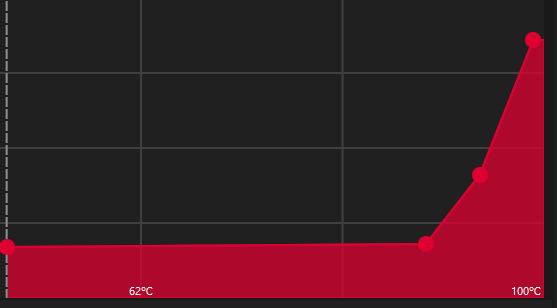
and it's not like my case isn't well ventilated, i have 2 Arctic P12s blowing cold air from outside of the case directly at it, playing with fancontrol and hooking my case fans speed to the GPU temp lowers it quite a bit (barely above 90°C and 1800RPM) but it's still a bit more than I like and it prevents me from raising my power limit to 120W, then the card is whining at almost 3kRPM

Is my sample defective? its XFX variant, mainly 210 SWFT with two fans? i heard a lot about botched heating installation in GPUs, insufficient paste amount etc, could this be it?

9


I fix consumer (OEM/SI and custom builds) PCs and am training some co-workers that are currently less experienced in building. The big thing I would like to have around for everyone's benefit is simple charts for things like screws/mounts. With the sizes/dimensions/names, especially the specific technical names. That would make it easy to buy extras instead of just typing "standoffs" and getting all the sizes presented that aren't correct. Nothing is more frustrating than having all the parts, but not screws/standoffs/mounts/etc if there is an issue (sucks if a motherboard has an NVMe slot but the standoff and screw wasn't provided or lost).

That all being said, I would love to get whatever other folks have around for part charts. It is always nice to be able to show various examples of different parts that can help show differences if a physical item isn't around to demo. An easy example is showing how the different DDR generations have the notch in different places. Or Ethernet cable wire layout for re-heading a cable.

10


I have an LG-38WN95C monitor which has a single Thunderbolt 3 port, which I use for my work M1 Macbook Pro. It's really convenient to have a single cable running from my laptop to my monitor.

But is it possible to achieve something similar with a full desktop PC? My PC has discrete graphics and a motherboard with no video-capable Thunderbolt output.

I was thinking of using a Thunderbolt hub, but most of them look like they are for use cases where the Thunderbolt cable plugs into the host machine, and then the monitor and peripherals branch off from the hub using DisplayPort / HDMI and USB.

But I want to do the reverse for the video signal. I want the hub's Thunderbolt cable plugged into my monitor, with the hub's DisplayPort link used as an input, not an output, which is passed to the monitor.

I feel like Thunderbolt's bi-directional-ness and daisy-chainability should mean this is possible, but I have little experience using Thunderbolt and I find it difficult to understand what hardware is capable of what behaviors. And with Thunderbolt hubs as expensive as they are, I am hesitant to drop significant money on a blind experiment.

11


I'm currently using system from 2016, planning to upgrade. With current length of GPU, my current case can't accommodate them so need the case as well.

I'm thinking of Lian Li evo XL. however my question is regarding Linux compatibility for all the RGB elements (fans, AIO) etc. Are they well supported (if anyone have an experience)

I'm open to suggestions as well (case and cooling) If Lian Li is not supported.

12
submitted 3 years ago by to c/pcbuilding@lemmy.ml


Is there a website that supports pc builder for 1u server? I've supermicro chassis which I'm planning to populate with parts but figuring out parts hasn't been easy since I don't know about compatibility. Mainly looking for PSU, motherboard, CPU, RAM and storage - all these (without GPU) may not need compatibility as much but still good to know

13
14
submitted 4 years ago by to c/pcbuilding@lemmy.ml


TL;DR: dont buy "open box" products from Newegg