1


To be able to run Nushell scripts from your File Manager and have the terminal window of the running script not close when the script is finished executing or if the scripts exits, you can use these instructions to achieve this.

This example is on Linux Mint using Nemo as a file manager and GNOME Terminal as a terminal app.

  • Create the following script on your system and store the file where ever you like...

run-in-terminal.nu

def run-in-terminal [code: string] {
    # Using GNOME Terminal
    gnome-terminal -- nu -c ($code)
}

# The Nushell code that runs in the terminal
def get-terminal-code [script: string] {
    return $"
        try {
            nu ($script)

            print ''
            print ''
            print ''
            print 'Script finished executing'
        } catch {
            print ''
            print ''
            print ''
            print 'Script failed executing'
        }

        print ''

        # Must press enter to close terminal window
        input 'Press Enter to exit'
    "
}

def main [script:string] {
    run-in-terminal (get-terminal-code $script)
}
  • Create the Nemo action file and in the file, replace /path/to/run-in-terminal.nu with the path to the run-in-terminal.nu file...

~/.local/share/nemo/actions/nushell.nemo_action

[Nemo Action]
Name=Run in Terminal
Comment=Execute script in Terminal
Exec=nu /path/to/run-in-terminal.nu %F
Icon-Name=terminal
Selection=Single
Extensions=nu;

Now simply right click on any Nushell script file (.nu) in Nemo and you will see an option Run In Terminal.
2


cross-posted from: https://lemmy.world/post/48010802

I created a simple Nushell script that will always disable the default/internal monitor(s) on your laptop or external display when using AR glasses. I find this useful for when using AR glasses such as the XReal One which allows you to change the mode from regular mode to ultra-wide mode and when doing this, it will act as your unplugging the XReal ones and plugging in XReal one again in a new mode, causing the other display to become enabled.

To keep the laptop display always off, weather the laptop lid is either closed or open, this simple Nushell script will always disable the screen every X seconds (You can change it by changing the wait constant)

Simply copy this script and create a new Nushell script such as disable-displays.nu, add it to your startup applications with the command of nu /path/to/disable-displays.nu and it will run in the background. You will need to run xrandr command with all of your displays enabled to get the names of the displays and change the constants values in the script accordingly.

NOTE: This script may not work with a full Wayland setup and may only work on X11.

Enjoy

# RUN xrandr TO GET THE NAMES OF THE DISPLAYS AND SET THE VARIABLES TO THESE NAMES
const ar_glasses_display = 'USB-C-0'
const displays = [
    'eDP',
    'HDMI-0'
]

const wait = 5

def is-ar-glasses-connected [] {
    return (xrandr | str contains $"($ar_glasses_display) connected")
}

def disable-display [display: string] {
    xrandr --output $display --off
}

def enable-display [display: string] {
    xrandr --output $display --auto
}

loop {
    if (is-ar-glasses-connected) {
        for current_display in $displays {
            disable-display $current_display
        }
    } else {
        for current_display in $displays {
            enable-display $current_display
        }
    }

    sleep ($wait * 1sec)
}
3
Nushell 0.112.1 (www.nushell.sh)
submitted 3 months ago by to c/nushell@programming.dev


Today, we're releasing version 0.112.1 of Nu. This release adds structured markdown parsing with from md , a new % sigil to explicitly call internal commands, and a bunch of new config options to better shape Nu to your workflow, along with improvements to type checking for cell paths.

Full announcement: https://www.nushell.sh/blog/2026-04-11-nushell_v0_112_1.html

4
Nushell 0.110.0 (www.nushell.sh)
submitted 6 months ago* by to c/nushell@programming.dev


Today, we're releasing version 0.110.0 of Nu. This release adds a let pipeline command, an unlet command, improvements to the Polars plugin, improvements to explore, and faster ls on Windows.

5
submitted 6 months ago by to c/nushell@programming.dev
6
submitted 6 months ago by to c/nushell@programming.dev
7
submitted 7 months ago by to c/nushell@programming.dev
8
submitted 7 months ago by to c/nushell@programming.dev
9
submitted 7 months ago by to c/nushell@programming.dev
10
Nushell 0.109.1 (www.nushell.sh)
submitted 7 months ago by to c/nushell@programming.dev
11
submitted 8 months ago by to c/nushell@programming.dev
12
Nushell 0.109.0 (www.nushell.sh)
submitted 8 months ago* (last edited 8 months ago) by to c/nushell@programming.dev
13
Nushell 0.108.0 (www.nushell.sh)
submitted 9 months ago* by to c/nushell@programming.dev
14
Nushell 0.107.0 (www.nushell.sh)
submitted 10 months ago by to c/nushell@programming.dev
15
16


This release fixes some issues related to the Windows MSI installer and the Nushell winget package. macOS and Linux users are not affected.

17
18
submitted 1 year ago by [M] to c/nushell@programming.dev
19
Nushell 0.104.0 Release (www.nushell.sh)
submitted 1 year ago* (last edited 1 year ago) by [M] to c/nushell@programming.dev


Today, we're releasing version 0.104.0 of Nu. This release adds additional job control capabilities, many datetime improvements, and a number of new Polars commands.

20


Starship is a customizable prompt with support for multiple shells, including Nushell.

Starship v1.23.0 includes:

completions: Offer Nushell completions (#6366) (df454d5)


The completions can be generated in the env.nu into an autoload dir:

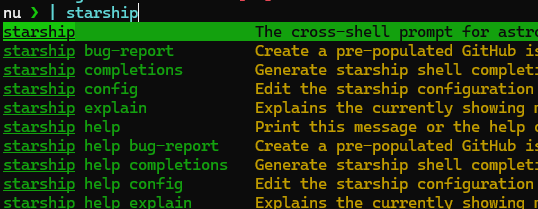
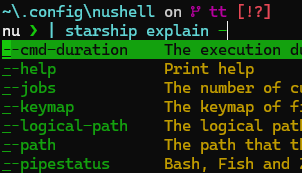
starship completions nushell | save --force $'($nu.user-autoload-dirs | last)/starship-completions.nu'

I have a setup that generates env files only once per day, resulting in faster shell startup otherwise.

call-if-old $'($nu.user-autoload-dirs | last)/starship-completions.nu' {|filepath| starship completions nushell | save -f $filepath }

call-if-old is a command I defined.


Completions Demonstration:

21
submitted 1 year ago by to c/nushell@programming.dev
22
submitted 1 year ago by [M] to c/nushell@programming.dev


Highlights:

  • Support for Background Jobs
  • Official .deb, .rpm, and .apk packages
  • Custom Command Attributes (@example, @search-terms)
  • std-rfc Module (experiments considered for the std lib)
  • Improvements to LSP
  • Improvements to Reedline Vi-mode
23


My website is implemented through Hugo, with content sources in Markdown. Metadata is added through a so-called "front matter" header within Markdown files. I noticed date metadata (front matter) was missing on content pages and consequently had 2001 on RSS feeds.

I used Nushell to en-mass add page dates after-the-fact, with date values determined through Git.

# Determine pages with missing date front matter (may be missing pages that have `date = ` as content)
glob **/*.md | where {|x| $x | open | not ($in | str contains 'date = ') } | save missing.json

# Determine content creation dates through Git add authoring date
open missing.json | wrap path | upsert date {|x| git log '--follow' '--diff-filter=A' '--format=%ad' '--date=iso' '--' $x.path | into datetime } | save dates.json

# Prepend date TOML front matter to closing fence
open dates.json | each {|x| $x.path | open --raw | str replace "\r\n+++\r\n" $"\r\ndate = \"($x.date | format date '%Y-%m-%d %H:%M:%S')\"\r\n+++\r\n" | collect | save -f $x.path }

Example [inline] result/fixup:

date = "2022-08-07 18:31:18"
+++

Some work details and manual cleanup (e.g. pages with resource front matter where the date declaration must be placed before them) omitted.

24


I added two solutions to the Rosetta Code FizBuzz page in Nu.

The one that was already there was quite confusing/non-intuitive to me; with string determination, and by index value fixups.

I like the match solution because it's structurally obvious and demonstrates the record-field-value match and logical case matching:

1..100 | each {
  { x: $in, mod3: ($in mod 3), mod5: ($in mod 5), }
  | match $in {
    { mod3: 0, mod5: 0, } => 'FizzBuz',
    { mod3: 0, mod5: _, } => 'Fizz',
    { mod3: _, mod5: 0, } => 'Buzz',
                        _ => $in.x
  }
} | str join "\n"

Do you have alternative suggestions or improvements?

25


Nushell is a powerful shell and scripting language with strong typing, querying, and piping functionalities.

This release adds runtime pipeline input type checking, several new commands and operators, and various other miscellaneous improvements.

view more: next ›