1


I posted in Android and iPhone communities a couple of weeks ago seeking a solution or at least a reason for issues I've been having with cell phones and a tablet but did not get a resolution, so I'm reposting with updates.

I use a Pixel 9 Pro XL and my spouse has an iPhone 17 Pro Max and an iPad A16. A few months ago my P9PXL started popping up an error message that liquid was detected when I plugged most charging cords into it. The phone became very particular about which charging cords (blocks?) it would work with. The liquid detected error message stopped popping up after a week or two but the sensitivity to which cords it would work with has continued to this day. Interestingly it seems to work best with cheap charging cables and blocks, as opposed to higher dollar/powered cables and blocks.

A few weeks ago the same exact problem began to occur first with my spouse's iPad A16 and then shortly after with their phone 17 Pro Max. They often get a warning message about liquid detected but not always. Sometimes when they plug one of the devices in simply nothing happens. Sometimes they get the liquid detected warning. If they get the liquid detected message there's an option to tap to bypass it. Sometimes when you tap to bypass the device will start charging and sometimes it won't.

I have bought numerous chargers and cables off of Amazon trying to find a fix. All of the blocks and cords are PD and many are supposed to be capable of higher powered charging, i.e. faster. These items range from 20w to 65w. More often than not ALL of the devices (my P9PXL, the iPhone 17 Pro Max, and the iPad A16) will work with a cheap low power charger/cord purchased from a gas station, as opposed to the higher powered PD compatible items I researched and bought off Amazon. In fact, I have 3-in-1 charging cables that likely came from a convenience store that I keep plugged into the USB-A ports at each end of the couch. Often either/both our phones will not work with the USB-C connection but WILL work with the Apple lightning connection using a USB-C adapter! WTF?!

I have tried charging all three devices at both work and home with no difference in how well they charge. Also, neither my daughter's Samsung Z Flip 5 nor an iPhone 13 we use for work have any of these charging issues. Those devices work with everything without any problems. It's just the P9PXL, iPhone 17 Pro Max, and iPad A16 that are temperamental about charging.

When I posted this problem initially a couple of weeks ago the overwhelming response in both the Android and the iPhone communities was to clean the ports. I had already had my Pixel phone cleaned by a guy at a Best Buy Geek Squad counter but that didn't do anything. But I did as advised and cleaned all the ports of all the devices myself using 91% isopropyl alcohol, the pointed end of a plastic floss stick, and a couple of small brushes that I had. Cleaning the ports seemed to help improve connectivity a tiny, tiny bit initially but did not resolve the unpredictable charging issues.

I then took my P9PXL to the guy at the phone repair kiosk at the mall to see if it would make a difference having it 'professionally' cleaned. However, instead of cleaning any of the devices he plugged some sort of reader into the charging port of my phone that declared it good and in working order. But when he plugged my phone into the USB-C charging cable he had as part of his repair set-up it did nothing. So he declared my phone's IC chip damaged. He then did the same thing with my spouse's iPhone 17 Pro Max, which also said the port was healthy, yet the phone would not charge. So the mall repair guy diagnosed all the devices as having damaged IC chips but he never cleaned the ports, which is what I went to him for. I don't trust that diagnosis though because the problem is so hit and miss.

For example, I took all my charging blocks and cables up to work and went through them trying different combinations until I found one that worked with everything. This was a dual 20w charging block (each port has a dedicated 20w port) along with a braided USB-C Apple cord that came with an Apple device. This combo of charging block and cable worked on all three devices at work. I had multiples of both the charging block and Apple cable, so I left one set at work and took another set home.

At the end of our couch we have two end tables that have two US electrical outlets, one USB-C port, and one USB-A port. Both of the Apple devices charged using the charging block and/or cable in all three of the power outlet types. (Used a USB-C to A adapter to test that port.) However, today I plugged the iPhone 17 Pro Max into the cord that was plugged into a charging block that was plugged into the US electrical outlet that's made into the end table. It did not work when it had previously. I then pulled the cord out of the charging block and plugged it directly into the USB-C port made into the end table. It still did not work. HOWEVER, when I plugged my Pixel 9 Pro XL into the cord plugged into the USB-C port it did work and began charging my phone. BUT when I pulled the charging cord out of the USB-C port and plugged it into the charging block that was plugged into a US electrical outlet also made into the end table it DID NOT work.

This all just simply does not make any sense to me at all. There does not seem to be any logical rhyme or reason to this issue we're experiencing between three separate services from two different manufacturers.

2
Charging issue (lemmy.world)
submitted 1 month ago* (last edited 1 month ago) by to c/iphone@lemmy.world


So I'm in a mixed marriage - I'm Android and they're iPhone. Yet we're both experiencing the same issue. A few months ago my Pixel 9 Pro XL suddenly got super finicky about corded charging. It either simply wouldn't charge when I plugged it in or it'd pop up a 'liquid detected' warning message, even though there was no liquid whatsoever. After a few weeks the problem semi-resolved itself. The liquid detected warning message quit popping up and my Pixel phone got better about corded charging, although it still did nothing when I plugged it into some chargers it had previously worked with.

So now several months later not only is my spouse's iPhone 17 Pro Max doing the exact same thing but their iPad A16 is too. There is no rhyme or reason to it. Neither device wants to charge with any charger or cord. Interestingly, on the occasion I do manage to get a device charging it is usually with a cheap third party charger, like from a convenience store. I have several 3-in-1 chargers with different connection types. I seem to have slightly better luck occasionally with the Apple devices using the lightning cable with a USB-C adapter weirdly enough.

I've ordered charging blocks and cables off Amazon and they either won't work at all or they work for a while and then stop after a few weeks. I am more tech savvy than the average person but not expert by any stretch. However, I am ensuring that I'm ordering PD charging blocks and compatible cables ranging from 20w to 65w.

We can wirelessly charge the iPhone, so it's not dire but the iPad has become a constant struggle. The power will get down into the teens and I'll mess with it for two days before it just suddenly starts charging using a block and cord I've already tried before. Sometimes the override button will work when it says liquid detected and sometimes it won't.

This week I ordered charging blocks and cables that are PD and capable of reaching up to 65w. The product description specifically says that it will work for an iPhone 17. However, they arrived yesterday and they do not work for my spouse's iPhone 17 Pro Max, iPad A16 or my Pixel 9 Pro XL. Both of the Apple devices pop up the liquid detected warning and my Pixel simply does nothing. However, the new chargers work great with an old iPhone 13 we have for our business (using a C to lightning adapter) and it works fine on our daughter's Samsung Z Flip 5. (In fact it fully charged her phone from 1% to 100% in a little over an hour!)

I have tried using the Apple cords that came with the devices but since they no longer provide charging blocks I don't think that any of mine are 'official' Apple brands and, even if they were, they'd be years old now, going back to whenever they used to include the charging blocks with the devices.

I have googled this issue and cannot find any useful information. There has to be some commonality between the new Apple devices and my Pixel 9 Pro XL that's causing them not to work with the chargers.

This is the latest charging set-up I ordered if the specs happen to tell you anything...

https://a.co/d/0hQUYPk4

3
4


I’ve had an iPhone 15 Pro Max since October 2023. I’m happy with it and would like to use it for a few more years.

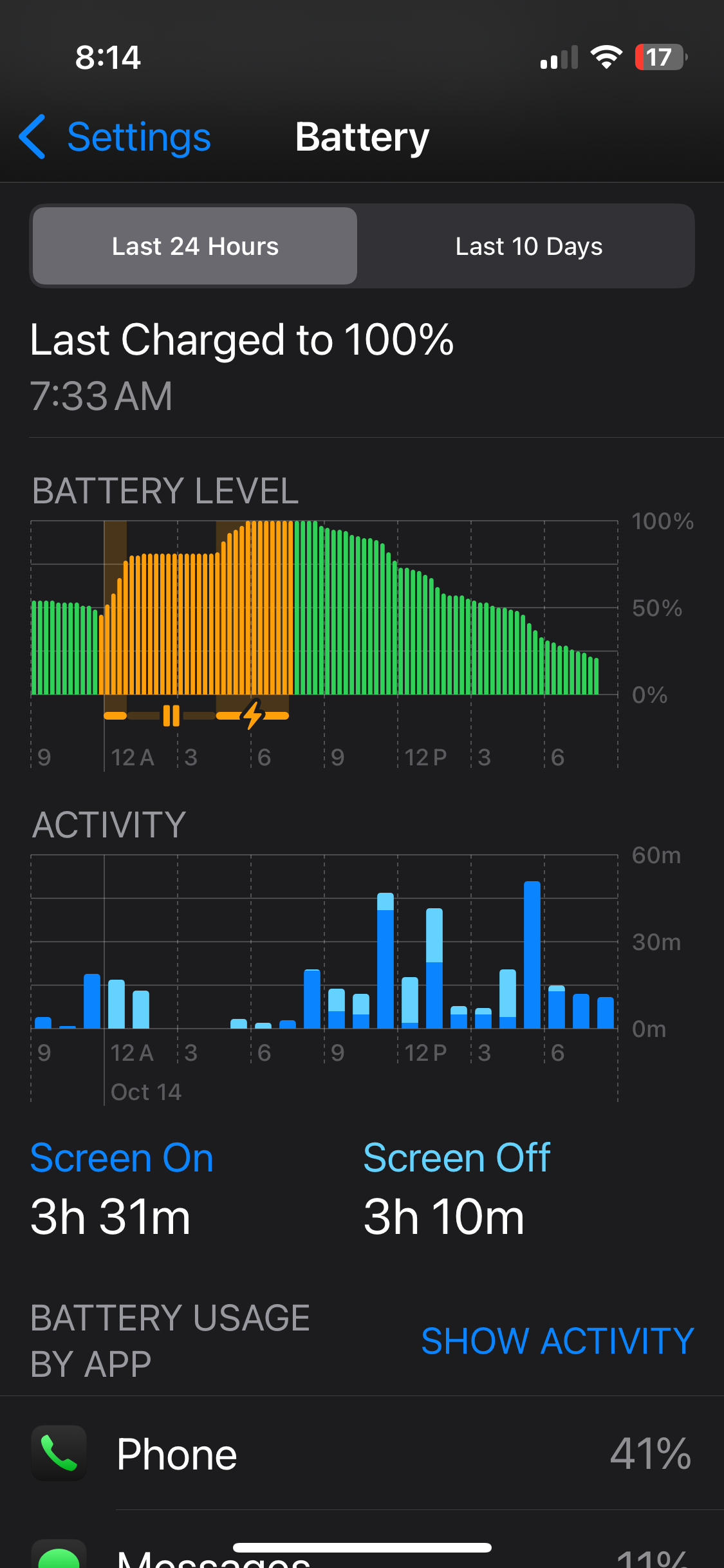
One thing bothers me a lot. The battery consumption of the apps and the fact that it keeps freezing and getting really hot.

According to the check, the battery is in normal condition and at 84%.

The memory is only half full.

What could be the reason for this?

5
6


Helloo, so I want to create a shortcut which brings me to the Whatsapp preferences in the settings App. For that, I need the Bundle ID which i found out to be "net.whatsapp.Whatsapp" via Method 1 of this guide. I created a "Open Url" shortcut using the "Settings For App" URL of this list, and this is the result: prefs:root=net.whatsapp.Whatsapp But it doesn't work, it just sends me to the settings App wherever I left it. Anybody know what I'm doing wrong?:O

7


Its nice to watch or listen youtube while playing some game or using instagramvcffff

8


Basically just needs layers and the ability to place, resize, etc. stickers?

Stores so filled with random trash these days, ik more than a few decent options must exist.

9
submitted 1 year ago by to c/iphone@lemmy.world


FYI this update messed up faceid. Had to fiddle with its settings to get it back to work…

Reading apple forums it seems it rarely happens with updates on specific devices with supposedly faulty sensors. Faulty like in not 100%.

My iPhone was repaired with full screen replacement when I bought it refurbished, I guess it’s a warning shot 🙂‍↕️

10


This is a real productivity booster

11
iPhone 16e (www.apple.com)
12


If thats the case it will be great. I have it with 256GB of storage and i would love to have ios 19 on it. 😁

13
 
 
14


been a really long time android user, dont dislike android, but there are a few main things... green bubbles #1 -- with my wife and family, #2 td bank cards -- doesn't let me add a td credit card or debit to my wallet for contactless card (only iOS) #3 facetime, yes ofc my wife wants to facetime me before messenger or google meet/duo

15


Hi there,

I’m looking for an app with a good widget that would let me track the stocks I’ve invested in. The main issue I’m having with the system app is that the widget is limited to 6 symbols and if you are using an app to track multiple stock prices on a widget, I would love to know what you use. So far tried a few apps but had no luck. Thanks in advance.

16


Just thinking back to the iPhone 6 which is 10 years old this year. I’m trying to work out if there are any features people use that weren’t available 10 years ago?

My dad still uses my old iPhone 6, and it really highlighted for me that innovation has stagnated in the last 10 years, unless I’m missing something.

17


I have noticed a major issue with my iPhone. No matter what I try, I can't open a private tab in Safari. This is not good, as it means I have to manually clear my cookies (which is impractical) or disable them altogether (which breaks some sites).

As of today, I have an adult Apple ID, but my dad is the organiser of the Apple family.

I have tried disabling content restrictions in Screen Time, but it didn't do anything. Web Content is set to "unrestricted".

There is no switch or button in Settings > Safari.

I have no configuration profiles installed that could change this. All I have are a few root certificates, a bunch of fonts, and an APN cert.

Private mode is fully functional in third-party browsers, but they do not support extensions or userscripts and provide marginally worse fingerprinting protection.

Can anyone help?

18


I’m still on the iPhone X, and the latest models just don’t have any features I’m excited about. I was thinking about what would make a difference to me and I think a really cool feature that would make me upgrade is thermal imaging.

Thermal cameras are expensive and the resolution and frame rate is generally rubbish because they are a niche item, but they are so useful. I’ve used them for everything from fixing heating systems, cars, and electronics to simply checking if my dog is still in the garden in the dark, or working out where ‘that draft’ is coming from.

Thermal imaging needs to be brought into the mainstream for price reduction and development, that integration to the next generation iPhone can deliver.

Am I just a weirdo, or would you like a thermal camera on the iPhone?

19


Anyone know why my statistics reset on its own..? Its not the first time it happand. Is it because i charged my phone from 62% back to 100%..? I red on apples official forum that apperently it resets battery statistics but im not sure, because i think some times i charge it from 80% and nothing happends.. Meaby i dont charge it to 100% but to 98% or something like that, so thats why it doesnt activate reset function..?

20


I just want to rant. Was using my iPhone X since launch and figured I should finally upgrade. Got the iPhone 15 pro when it came out. The digital island is hideous. Makes no sense, and I don’t see how those features couldn’t have been incorporated into the notch. We just lose vertical screen real estate. Feels like big brother is staring at me constantly, whereas the notch kind of faded away.

The camera bump is huge, and feels awful to touch. It also makes case designs bad as well with the raised edge. It’s very hard to find a case without the raised square borer around the camera bump. These cases leave marks in all my pants. The funniest thing to me is there are billboards that feature the raised camera of the iPhone 15. There are also posters when you walk into an Apple Store of the same. As if they think it’s beautiful. I wish I had gone with my gut and not purchased the phone.

Making me think more and more about running Graphene on a pixel. Ugh, you just can’t win with phones now a days.

I realize for better cameras, you need longer lenses, but it should be a phone first.

21


I have an iPhone 15 that when my car picks up a phone call on the hands-free system. It takes a moment to Ashley pick up and then is at first with the volume. Is this an iPhone issue that is known? Could it be T-Mobile? Or could it be my 2014 Avalon system? I didn’t have his problem with my android phone prior to this iPhone switch. Thanks for any insights.

22


I'm looking for a parental control app for iOS 17 that allows me to not only restrict apps etc but also lets me over-ride the schedule and allow the kiddo to play as I see fit.

We were using the Screentime Labs app on android. But on iOS it doesn't work well.

23


I currently have no use for spatial photos, can’t justify the price of the Vision Pro headset, and really don’t have a reason to have strong motivation.

Looking back at old family photos, I see sepia from my parents, faded from when I was a kid, and low rez/faded even from when my kids were little, looking across that timeline, the march of technology is clear. Older photos are noticeably older (even when not printed).

However I have a phone that can take spatial pictures and has extra storage, and I just had to raise my iCloud storage. Assuming spatial photos and videos becomes commonplace, it will be another noticeable jump in photo technology. Reviewers of the Vision Pro rave about them

Do you think

  • spatial photos will become common/normal, or are just a fad like 3D tv?
  • is there a standard format or is it Apple specific?
  • it’s worth getting a jump on the technology for personal photos, even without a use yet? Presumably I will have a use at such time as I look back on personal photos
24
submitted 2 years ago* (last edited 2 years ago) by to c/iphone@lemmy.world


I've got an old iphone SE 2 second hand, pretty sure the seller is dead at this point. I'd like to use a new sim card, but the carrier is locked (I think Tmobile)?

Glancing online, it seems like the retailer will want proof of purchase. Is there anyway to do this easily from home, or should I start looking at jailbreaking it? (This is for a friend; I'd rather keep this as simple as possible)

Follow up for any future wanderers: This worked, but only because the seller was indeed dead. They asked me to pay the balance on the account, took a credit card payment, and then unlocked it ~5 min later. Not too painful.

25


Looking for minimal and thin with a good ‘button feel’ or just holes in the case to allow button access for a 15 Pro.

What are your favorites?

view more: next ›