301
302


...or whatever remains of it?

Yeah.
I finally found what I was searching for, usage of RW media similar to DVD-RAM. Only to find it's been removed from Linux Kernel: https://www.phoronix.com/news/Linux-To-Remove-pktcdvd

Worry not, something remains: https://www.kernel.org/doc/html/v6.1/cdrom/packet-writing.html

According to the DVD+RW specification, a drive supporting DVD+RW discs shall implement “true random writes with 2KB granularity”, which means that it should be possible to put any filesystem with a block size >= 2KB on such a disc.

And indeed, with DVD+RW disc, I can just do so. Even if it's really sub-optimal.

However, some drives don’t follow the specification and expect the host to perform aligned writes at 32KB boundaries. Other drives do follow the specification, but suffer bad performance problems if the writes are not 32KB aligned.

Anyway...

ext4 on DVD

So, yes. After initial format, I can just

mkfs.ext4 -b 2048 /dev/sr0

Might have been a coincidence as I just used an old disc and failing drive, but trying block size of 4096B made formatting extremely slow. No wonder, after inspecting the disc, it was clear the formatting fully re-wrote it, which didn't happen with 2048B BS.

tar

That worked as well. Exact command I used:

tar -vcf /dev/sr0 -b 4 files/

I am not sure if my setting for blocking factor made any sense whatsoever. I didn't retry this. As I said, old disc and drive. It would work in bursts, then get stuck for a long time. Writing ~500MB took roughly an hour.
Reading it worked well though.

Who needs an FS when you have tar.

Partition table on DVD - where the dreams fall apart

fdisk /dev/sr0

That... worked. I created GPT and added 2 partitions. After writing the changes, I reinserted the disc.
Aaaaaand... nothing.
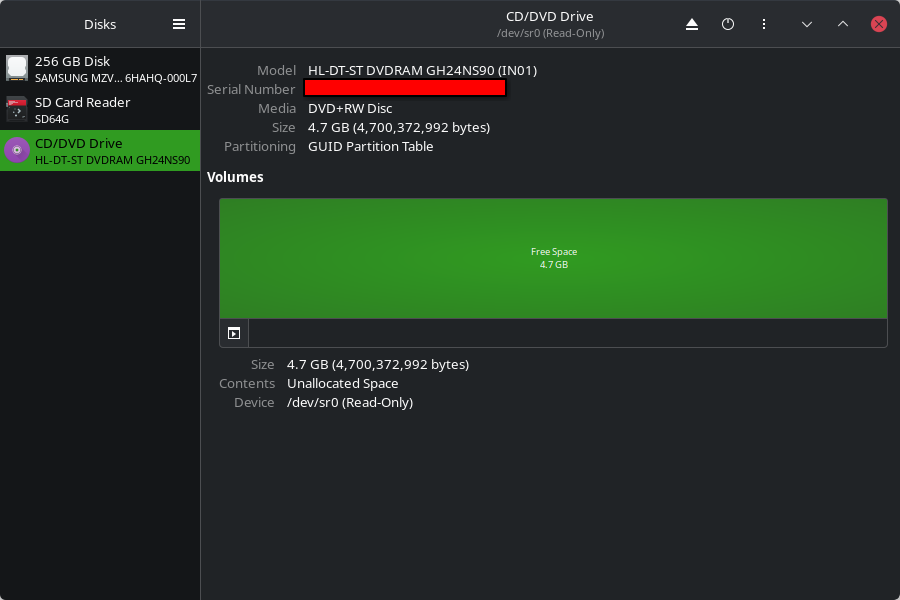
You can see that there is indeed a GPT on that DVD+RW, which feels crazy. But, where are my partitions?
Looking in /dev, I found no mention of partitions.

ls /dev/sr0*
/dev/sr0

Let's check fdisk again:

fdisk -l /dev/sr0
Disk /dev/sr0: 4.38 GiB, 4700372992 bytes, 2295104 sectors
Disk model: DVDRAM GH24NS90
Units: sectors of 1 * 2048 = 2048 bytes
Sector size (logical/physical): 2048 bytes / 2048 bytes
I/O size (minimum/optimal): 2048 bytes / 2048 bytes
Disklabel type: gpt
Disk identifier: 6AE020A5-1F51-46A6-8741-C28915AF6208

Device      Start     End Sectors  Size Type
/dev/sr0p1    512  524799  524288    1G Microsoft basic data
/dev/sr0p2 524800 2294783 1769984  3.4G Linux filesystem

Hmmm. I didn't use root, so I got a hint from fdisk. I did re-insert the disc, so it should've been irrelevant now, but at least it pointed me to a potentially useful command.

# The kernel still uses the old table. The new table will be used at the next reboot or after you run partprobe(8) or partx(8).

sudo partx -av /dev/sr0
partition: none, disk: /dev/sr0, lower: 0, upper: 0
/dev/sr0: partition table type 'gpt' detected
range recount: max partno=2, lower=0, upper=0
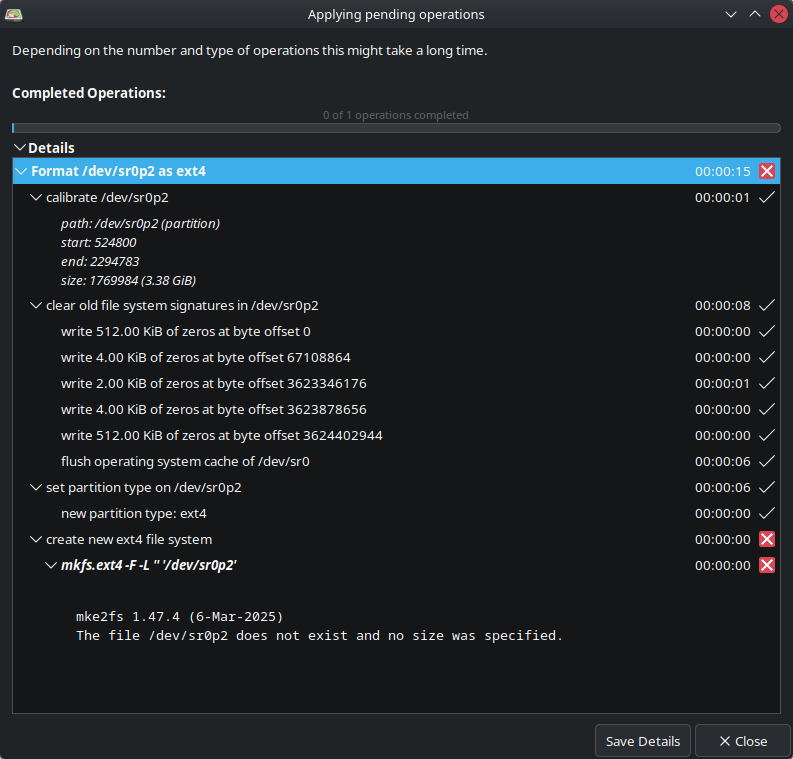
partx: /dev/sr0: adding partition #1 failed: Invalid argument
partx: /dev/sr0: adding partition #2 failed: Invalid argument
partx: /dev/sr0: error adding partitions 1-2

Invalid argument?
Does it mean I can't load a partition table from a DVD?

LVM to the rescue? (no)

Short answer in this case:

sudo pvcreate -v /dev/sr0
  Cannot use /dev/sr0: device type is unknown

Finally at last, a disc directly playable with aplay

Obviously, I can write bytes to the disc, so this isn't special. But it feels cool.
I find it unfortunate that I can't simply take data of audio CD, playing it with aplay. But now I can at least do so with a DVD.

ffmpeg -i Stan\ LePard\ -\ Velkommen\ \(1996\).wav -f s16le -acodec pcm_s16le -ar 44100 -ac 2 tmp/velkommen.raw

And writing with dd

dd if=tmp/velkommen.raw bs=2048 status=progress of=/dev/sr0
57145344 bytes (57 MB, 54 MiB) copied, 16 s, 3.6 MB/s
27930+0 records in
27930+0 records out
57200640 bytes (57 MB, 55 MiB) copied, 33.49 s, 1.7 MB/s

It might be good to know this got stuck the first time at the end. So I used truncate to pad it with zeros to a multiple of 2KiB. Again, might have been a coincidence (sample size 2).

And finally, the dream is achieved:

aplay -f cd /dev/sr0
Playing raw data '/dev/sr0' : Signed 16 bit Little Endian, Rate 44100 Hz, Stereo

Now I could perhaps try to make a script/program which would take list of files, convert them to raw PCM, record track byte offsets and other data (like track title), concatenate the audio, add the info data in some specific format, and also have a program/script to read the info and play the tracks!

Re-inventing the wheel disc.
303


I Was thinking about switching to full-time Linux for years, maybe decades. I've had Linux installed on side-computer (Ubuntu and Mint on my home server), but not on my main laptop. I made the switch on 23 March. I decided to install Omarchy, because it looked cool and it was a new and refreshing user experience. I thought I´d give it a try.

But I don´t love the fascist captain and I don´t love the bloat. Now I also hear that it is being build and maintained by AI.

But also, I love the way Omarchy works. I love the keyboard oriented aproach. I love the super-button. I love the menus. I love the nvim setup. I love the desktop layout. I love that it just works out-of-the-box and that it is (or appears) stable. I love that installing anything is so easy.

I appreciate Omarchy for being such a good gateway drug into the Linux world for people like me and I think it deserves some credit for that. But I also have ethical complaints that ruin the fun.

So what I'm really looking for is, how can I take all these features I like so much, and apply them on a proper distro?

The obvious solution seems Arch, but I want my computer to work without having to spend weeks learning how all the mechanics and fine configuration details work. I don´t even now what the configuration details are that make the things I like. Maybe that's not an issue with Arch, but I don´t know much about Arch tbh. I haven´t had the time to learn about it.

Or maybe I'm just asking too much as an old man (though dhh is a decade my senior) and I should just go back to Mint...

304
305
306
307
308
309
310


Some of the more interesting points:

  • transition from dbus-daemon to dbus-broker
  • package-agnostic App Center
  • simplified installation experience that dramatically reduces complexity during partitioning and storage configuration
  • new onboarding experience that moves personalization and system setup into a dedicated first-boot experience. Rather than asking users to make every decision during installation
  • on-device speech-to-text engine integrated as a native desktop input method, providing a foundation for fast, private, and offline voice interaction
311


How to Use AI for Linux Kernel Development

This is about using AI for Linux kernel development, though most tips can apply elsewhere.

I know, I know. AI is quite polarizing in today’s world, to say the least. I will be addressing ethics later. But for now, let’s focus on the tech.

AI is useful because it prototypes fast, multitasks well, and gives you something to work off of instead of making you start from zero. Do I think it replaces...

Read more: https://logicalerzor.codeberg.page/blog/ai-kernel-development/

#Linux @linux

312
313
314
315
316
317
318


So I've been recently made aware of Void Linux and decided to give it a go while I'm distro shopping to leave *buntu behind.

I downloaded the ISO and tried to install it in a VM. Ohohoho boy this is not as user friendly as other distros. I'm really glad I have 25 years of experience under the belt.

Instead of just using the void-installer with the TUI and mostly default options, I tried installing it the way I would if it was my PC. So I had to go the advance route.

Thankfully there is really well written documentation to help you along with the process. (See here) Essentially you do everything by hand. Partition your disk with fdisk, create your filesystem with mkfs, and when you're ready, you launch the base installer (essentially the equivalent of a debootstrap if you're coming from a Debian background) to install a base system. Then you chroot into your drive and edit your configs, install packages, etc.

So the setup I did was to create a disk with a BTRFS partition, uing subvolumes like @, @home, @var, @tmp, @swap, @snapshot for the root, home directories, /var, /tmp, /swap and /.snapshots where the snapshots would be stored. I mounted my subvolumes in /mnt and "debotstrapped" my disk.

Then I chrooted into it and edited some basic /etc configs like locale and hostname, set timezones. Changed the root password, created a user and set its password, added the user to the wheel and cdrom groups and edited the sudoers file to allow users from the wheel group to execute passwordless sudo commands. Add the dhcpd service to /var/services, etc. I just followed the guide so far.

Then I got in the meat of it. My objective was to have a KDE Plasma desktop with Wayland with a login manager. That's when things got a bit complicated. The guide isn't really clear on what you need to have a wayland graphical system. I skipped the video card drivers part because I'm in a VM. But the instructions on intalling wayland weren't very clear on what packages were required. Installing a session manager like SDDM wasn't very clear either. Installing a base KDE Plasma destop was easy though. It's just a couple of meta-packages.

But yeah, luckily I found other online documentation. Like this straightforward video on how to install a basic KDE Plasma desktop system. I didn't understand why they installed X11 though. I wanted a Wayland system. But it turns out that SDDM, the QT based login manager that's meant to use with KDE (Though not mandatory) requires it! I also needed some stuff like D-Bus and elogind.

So far I've been able to get a graphical KDE Plasma desktop going. But I still ain't got sound. I'm pretty sure I installed the Pipewire package. Do I need anything else?

Also, I can't for the life of me create a god damn swap file. I didn't create a swap partition because I wanted to use a more practical swap file. I created the file using

sudo btrfs filesystem mkswapfile --size 4g /swap/swapfile

But to no avail. The sytem even crashes and the file system is remounted in read-only.

If anyone have any clues on how to set up these two things, I'd really appreciate it.

319
320
321
322
323
Hammers Without Handles (gardinerbryant.com)
submitted 2 months ago by to c/linux@programming.dev


I wanted to take a moment and talk about Linux UX because, let's face it... it sucks.

Actually, it's worse than that. Much of Linux's UX is technically correct and that makes it objectively wrong.

No. I don't want Linux to be more Windows-like. But I do want the most common Linux desktops to behave in a way that PC-literate folks can wrap their mind around — and do so from minute zero

324


95% of Plasma 6.6 users use Wayland!

325
view more: ‹ prev next ›