326
Your Git horror stories (programming.dev)
submitted 3 years ago* (last edited 3 years ago) by [M] to c/git@programming.dev


We all have been there... For the beginner it's easy to mess things up. What are your horror stories with Git?
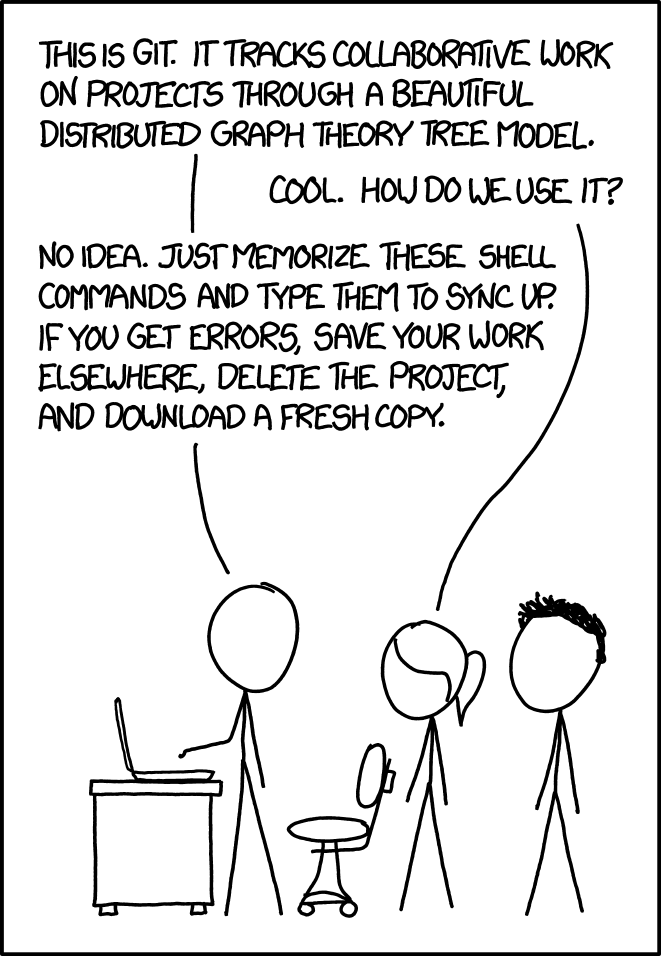
Link to xkcd

327


Easily create video animations (.mp4) of your Git commit history, directory from your Git repo.

328


Found this project which seems to provide lots of QoL things on top of git. Btw, this project is not maintained. Any alternatives for simpler git UI welcome.

329


checkout is one of the most confusing commands for new comers. This Stackoverflow explains how it can be replaced with switch and restore.

  • git switch can now be used to change branches, as git checkout <branchname> does
  • git restore can be used to reset files to certain revisions, as git checkout -- <path_to_file> does
330


I basically only use git merge like Theo from T3 stack. git rebase rewrites your commit history, so I feel there's too much risk to rewriting something you didn't intend to. With merge, every commit is a real state the code was in.

331


cross-posted from: https://programming.dev/post/222613

Although I prefer the Pro Git book, it's clear that different resources are helpful to different people. For those looking to get an understanding of Git, I've linked to Git for Beginners: Zero to Hero 🐙

The author of "Git for Beginners: Zero to Hero 🐙" posted the following on Reddit:

Hey there folks!

I've rewritten the git tutorial. I've used over the years whenever newbies at work and friends come to me with complex questions but lack the git basics to actually learn.

After discussing my git shortcuts and aliases elsewhere and over DMs it was suggested to me that I share it here.

I hope it helps even a couple of y'all looking to either refresh, jumpstart or get a good grasp of how common git concepts relate to one another !

It goes without saying, that any and all feedback is welcome and appreciated 👍

TL;DR: re-wrote a git tutorial that has helped friends and colleagues better grasp of git https://jdsalaro.com/blog/git-tutorial/

EDIT:

I've been a bit overwhelmed by the support and willingness to provide feedback, so I've enabled hypothes.is on https://jdsalaro.com for /u/NervousQuokka and anyone else wanting chime in. You can now highlight and comment snippets. ⚠️ Please join the feedback@jdsalaro group via this link https://hypothes.is/groups/BrRxenZW/feedback-jdsalaro so any highlights, comments, and notes are visible to me and stay nicely grouped. Using hypothes.is for this is an experiment for me, so let's see how it goes :)

https://old.reddit.com/r/learnprogramming/comments/14i14jv/rewrote_my_zero_to_hero_git_tutorial_and_was_told/

332


Hey folks!

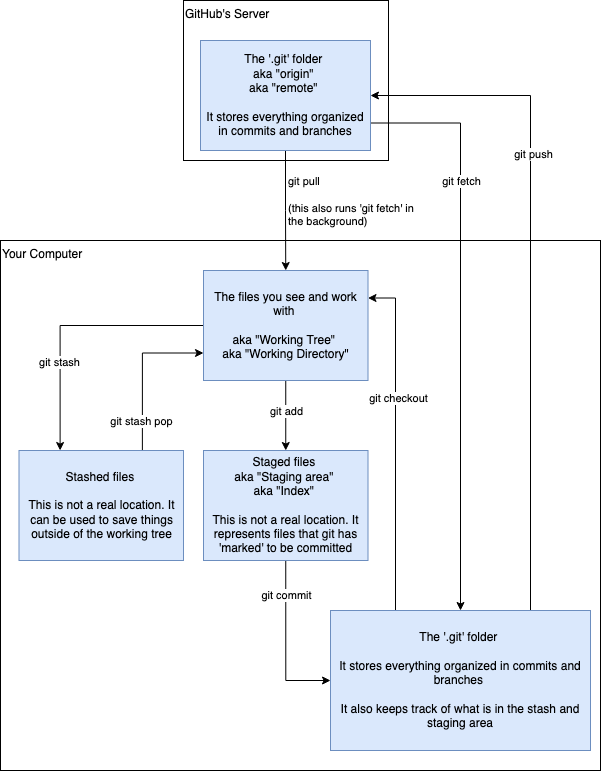
I've noticed that it's often difficult for newcomers to git to understand what the heck is happening and how the commands work.

Here's a flowchart that has helped me explain things in the past, and (more than once) folks have asked me for a copy of it to use as a cheat sheet. Hope it's helpful!
333
submitted 3 years ago by [M] to c/git@programming.dev


Have you ever used git bisect? If so, how did you use it? Did it help you find a problem which would otherwise be difficult to find? Story time, I guess?

334
submitted 3 years ago by [M] to c/git@programming.dev


Which courses or tutorials helped you most to improve your understanding of Git? Can you recommend and free/paid resources to beginners?

335
git rerere (www.git-scm.com)
submitted 3 years ago by [M] to c/git@programming.dev


The git rerere functionality is a bit of a hidden feature. The name stands for “reuse recorded resolution” and, as the name implies, it allows you to ask Git to remember how you’ve resolved a hunk conflict so that the next time it sees the same conflict, Git can resolve it for you automatically.

336
Git man page generator (git-man-page-generator.lokaltog.net)
submitted 3 years ago by [M] to c/git@programming.dev
337


posh-git is a PowerShell module that integrates Git and PowerShell by providing Git status summary information that can be displayed in the PowerShell prompt, e.g.:

example

338


This is a pretty neat tool that allows you to use regular git commands, but captures the output as a PowerShell objects. This allows you to use the power of PowerShell pipelines to enhance your git experience.

A couple of examples:

# Count logs by author
git log |
        Group-Object GitUserEmail -NoElement |
        Sort-Object Count -Descending
# Delete all branches except the current and main
git branch | 
        Where-Object -Not IsCurrentBranch | 
        Where-Object BranchName -NotIn 'main', 'master' | 
        git branch -d
339
340


I just found this. I could have used it the other day.

341
git difftool (programming.dev)
submitted 3 years ago by [M] to c/git@programming.dev


Which difftool do you use and why? I develop on Windows and I use KDiff3. It has worked flawlessly all these years. And just because of that I haven't really followed what else is out there. I suspect I'm in the minority?

342
Git - Git Aliases (git-scm.com)
submitted 3 years ago by [M] to c/git@programming.dev


My favorite is git h, which produces a nicely summarized log of commits on the current branch, with some highlighting and relative dates:

[alias]
    h = log --graph  --abbrev-commit --date=relative --pretty=format:'%Cred%h%Creset -%C(yellow)%d%Creset %s %Cgreen(%cr) %C(bold blue)<%an>%Creset'

What's your favorite Git alias?

343
Welcome to Git community (programming.dev)
submitted 3 years ago* (last edited 3 years ago) by [M] to c/git@programming.dev


Tools are critical for all professions. In programming, Git is central. Almost everything we do touches Git. We all need to master it at least to a level that it doesn't get in our way. But when you start getting hold of the basic concepts, it's also a powerful tool that is fun to work with. Hopefully this community will be a place to share our knowledge and help each other.